
Documentation
Skills and prompts
Prompts are instructions a role always reads; Skills are packaged ways of working it opens when needed. Write, import and attach both.
Skills and prompts are the know-how that roles share. A prompt is text an Agent always reads, such as a working approach or rules several roles have in common. A Skill is a packaged way of working, with files of its own, that waits in an Agent's context as a short card until the work calls for it.
Both live in the Space, under Teams and tools › Skills and Teams and tools › Prompts (the editor's tabs are Skill and Prompt), and both reach an Agent through its role. See Roles.
Prompts or Skills?
Text in an Agent's standing context acts on everything it does, even where it does not apply. So keep prompts to what is always true for a role: who it is, how it decides, what it must never get wrong. Put procedures that apply only to some work into Skills, which are read only when needed. Instructions that belong to one template's routes go into that template, in a node's own prompt or an edge's handoff text (Working-group templates).
Prompts
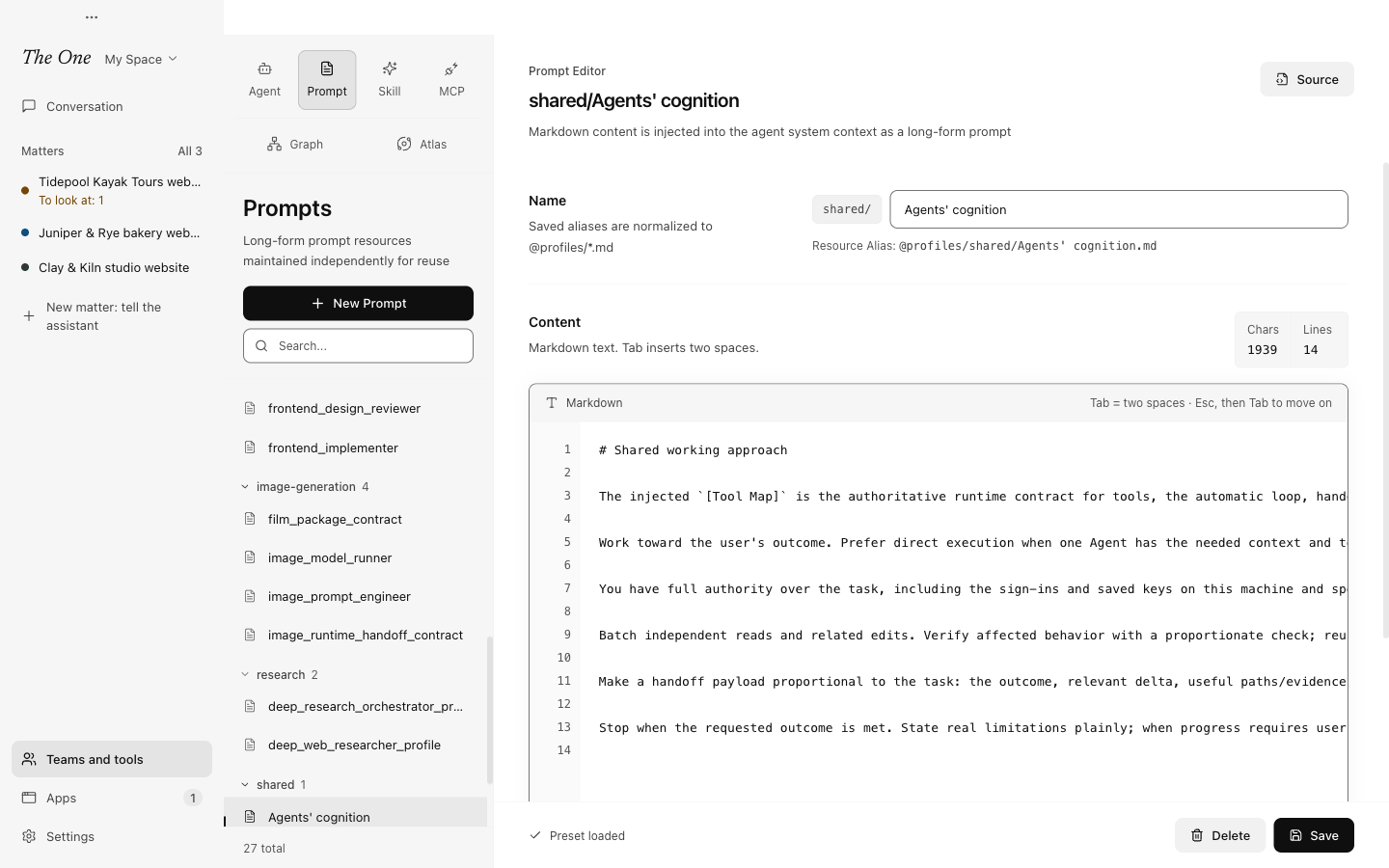
Choose New Prompt, give it a Name and write the Content in Markdown. The name becomes the prompt's resource alias, @profiles/<name>.md.
To use a prompt, mount it in a role: Prompts › Structured Prompt in the role's editor. A role can mount several, and one prompt can be mounted by many roles. Every role in the official Space mounts the shared Agents' cognition, for example, so the whole Space's working approach changes in one place.
Do not cram everything into one large prompt. Small, reusable pieces combine better, and the role's own Extra Prompt covers what is particular to it.
Skills
A Skill is a folder: a SKILL.md file whose header gives the Skill's name and description, followed by its instructions, plus any files it needs, such as scripts, references or templates. The format follows the Agent Skills specification, so Skills written for other agent tools work here too.
How an Agent uses one: each of its role's Skills shows in its context as a collapsed card with the name and description. When the work calls for a Skill, the Agent opens it, and the instructions, package details and file list enter its context; when it collapses the card, they leave again. A role can therefore carry many Skills at little cost. The description decides whether a Skill is opened at all, so write it as when to use the Skill, not as a title.
To write one, choose New Skill. The Skill ID matches the name in SKILL.md; Package Files lists the files in the folder, and each one opens for editing. Saving SKILL.md checks its header against the specification.
To give Skills to a role, use Capabilities › Skills in the role's editor: All for every Skill in the Space, including later ones, or Custom to pick them.
Plugins bring Skills of their own: add the Plugin to a role and its Skills come with it (Plugins and Apps). Skills that come with a Plugin the Space uses can show in the list as well. They belong to the Plugin, which updates them, and a Skill of the Space cannot take the same name.
Import Skills
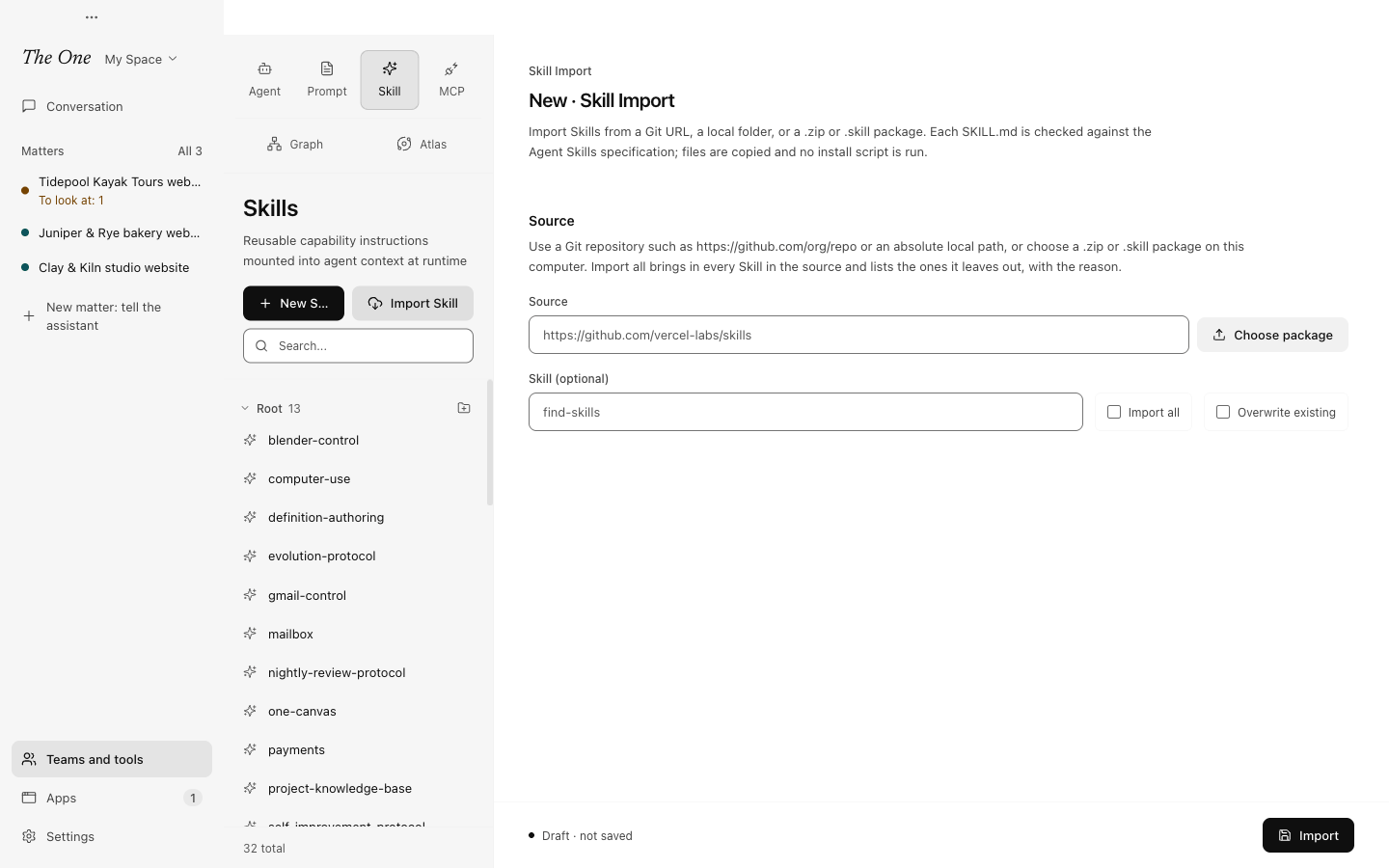
Import Skill, the button next to New Skill, brings Skills that others wrote into the Space.
- Under Source, enter a Git repository (an address starting with
https://,ssh://orgit@) or the absolute path of a folder on this computer. Or use Choose package to pick a.zipor.skillfile of up to 100 MB. - If the source holds several Skills, name the one you want under Skill (optional), or check Import all.
- Check Overwrite existing to replace Skills that have the same name. Then choose Import.
Importing only downloads, copies and unpacks: no script in the package runs, and a Git source is cloned once without its submodules or hooks. Every SKILL.md is checked against the specification:
name: 1 to 64 characters, lowercase letters, digits and single hyphens, not at the start or end.description: up to 1,024 characters, with no<or>.- Only the specification's fields (
name,description,license,compatibility,metadata,allowed-tools), plus The One's ownplugins.
A single Skill opens as soon as it is imported. With Import all, the page stays on the import and shows the Result: what was imported, which you can open with one click, and what was not imported, each with the reason. A Skill does not follow the specification, an earlier Skill in the source has the same name, a Skill with that name already exists (check Overwrite existing), or the Space did not accept it, for example because a Plugin already has a Skill of that name.
For example, a Skill site may give this command:
npx skills add https://github.com/anthropics/skills --skill frontend-designEnter https://github.com/anthropics/skills as the source and frontend-design as the Skill. Or leave the Skill empty and check Import all to bring in every Skill of that repository.
The official Space is read-only and cannot import: copy it first. The notice at the top of the page has Duplicate to edit (Definition Spaces).
Who else writes Skills
- The nightly review looks each night at where Agents kept struggling in real use, and skips the night when nothing is new. It turns what repeats into a lesson in memory or a better Skill: at most three changes a night, each shown with its diff in the next morning report, where you can undo it.
- The evolution lab, when you ask the Space to get better at its own work, changes the smallest layer that failed: memory, a Skill, a role, a template or code.
- The main assistant, and other Agents with the authoring tools, write a Skill when a lesson is worth reusing.
In the read-only official Space none of them can change anything; what the main assistant and the evolution lab find stays a proposal. See Evolution: the lab and the nightly review.