
Documentation
Teams and tools
The working groups the main assistant picks from, what each does and which matters it works for, and the Plugins, Skills, roles, prompts, external tools and models the work is done with.
Teams and tools is where you see the teams the main assistant picks from for each matter, what each one does and which matters it works for, and what the work is done with: Plugins and their apps, Skills, roles, prompts, external tools and models. You come here to look at a team or a tool, or to change one.
Teams and tools sits near the bottom of the sidebar, above Settings. Apps sits between them once a Plugin brings an app you can open.
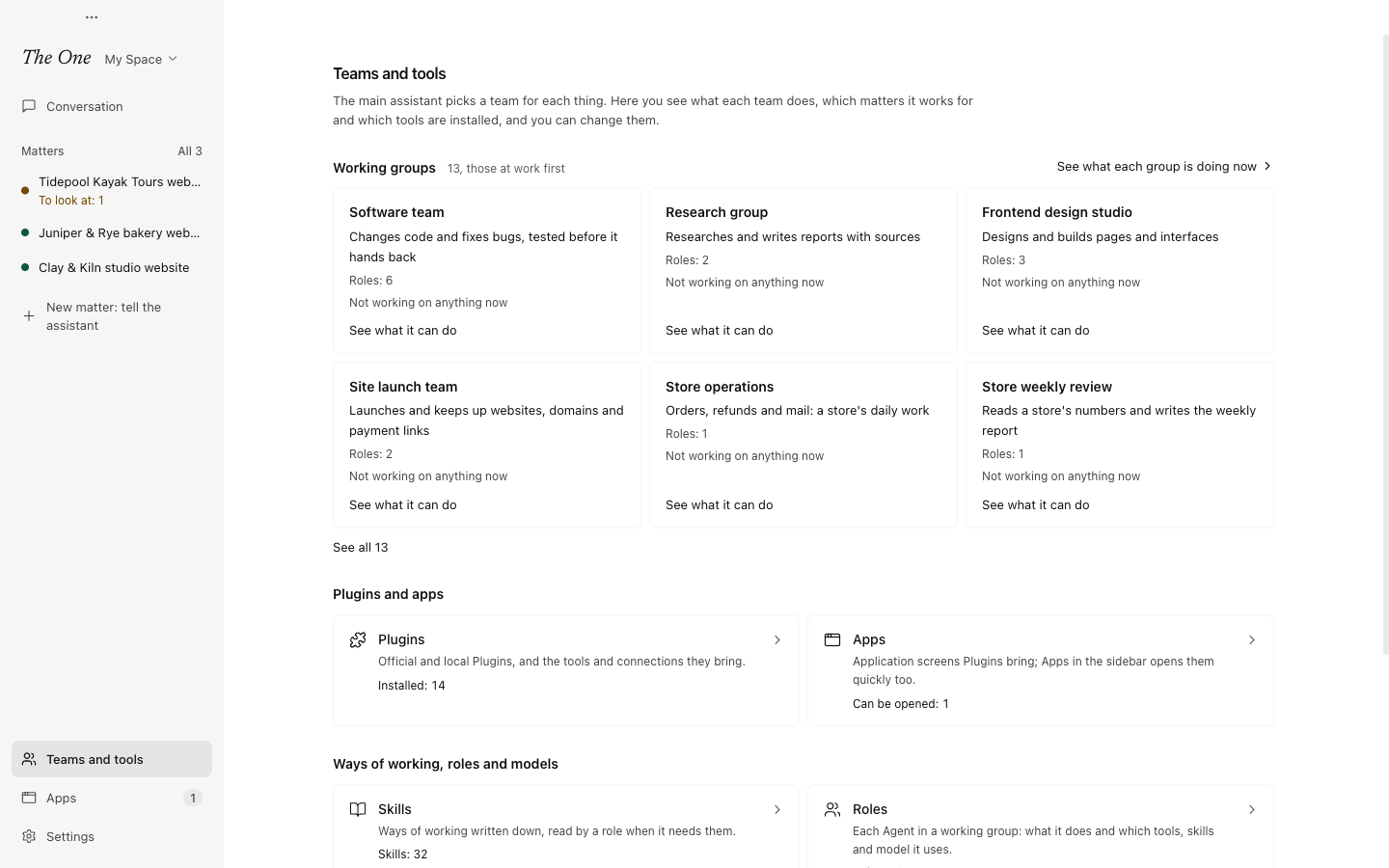
Working groups
The page starts with the working groups, one card for each. A card shows:
- the group's name in plain words, such as Software team, and what it does in a line;
- how many roles it has, such as Roles: 4;
- the open matters it works for, such as Working for 2: followed by their titles, each opening its board; or Not working on anything now;
- See what it can do, which opens its template in the editor of working-group templates (see Working-group templates).
The groups at work come first, the one working for the most matters first; then the official Space's groups in a fixed order, broad work first, and your own after them. Six cards show at first, and See all (such as See all 13) shows the rest. See what each group is doing now opens the Working groups page, with each group on your open matters and what it is doing (see Working groups).
The built-in groups, such as the General group, are not in the list of templates, so one gets a card only while it works for a matter, without a role count or See what it can do. The main assistant itself and the nightly review are not teams to pick, so they have no card.
Where the tools are
Below the working groups, the page leads to the editors of what the work is done with. Each place says how much it holds, such as Roles: 12, or None yet.
Plugins and apps
| Place | What it holds | Page |
|---|---|---|
| Plugins | Official and local Plugins, with the tools and connections they bring. | Plugins and Apps |
| Apps | The application screens that Plugins bring. Apps in the sidebar opens them too. | Plugins and Apps |
Ways of working, roles and models
| Place | What it holds | Page |
|---|---|---|
| Skills | Ways of working written down, which a role opens when it needs them. | Skills and prompts |
| Roles | Each Agent of a working group: what it does, and which model, prompts, Skills, tools and Plugins it uses. | Roles |
| Prompts | Longer instructions and rules that several roles share. | Skills and prompts |
| External tools (MCP) | MCP servers that connect Agents to outside services and data. | External tools (MCP) |
| Models | Model presets, and the default model for Agents that name none. This place opens Settings › Models and sign-in › Default model. | Models |
In the developer view
With the developer view on (turn it on in Settings › Developer), a last section, In the developer view, adds what developers look at:
| Place | What it holds | Page |
|---|---|---|
| Atlas | Templates, roles and prompts on one canvas, to see how they connect. | Atlas |
| Definition Spaces | Whole sets of templates, roles and settings: switch, copy, import and export them. | Definition Spaces |
| All runs | Every run as it was recorded: sessions, sub-Graphs and their Agents, with each Agent's messages and context. | All runs (developer view) |
| Evaluations | Fixed tasks that test the working groups, to see whether a change made them better or worse. | Settings |
Without the developer view you still reach them: Atlas is the Atlas tab beside the editors, Manage Spaces... in the Space switcher at the top of the sidebar opens Definition Spaces, and Settings › Developer has Open all runs and the Evaluations page.
What lives in the Space, and what does not
Templates, roles, prompts, Skills and the settings of external tools are files in the Space you are using, the active Definition Space. So are the request templates in the composer's Templates menu and the Space's memory (see Memory and recall). Switch Space and you switch the whole set, together with the main assistant, the matters, the triggers and the runs that belong to it. See Definition Spaces.
Two places on this page are not part of any Space:
- Models: model presets are saved on this computer, and every Space uses the same ones. A role or template that names a preset records its ID, so a Space you share needs models on the other person's computer as well. See Models.
- Plugins, and the Apps they bring, are installed on this computer, outside every Space. A Space only records which Plugins its roles use, with their settings that are not secret; connections and keys stay on this computer, and a shared Space carries the references, not the Plugins. See Plugins and Apps.
Where should something new go? Roles, prompts, templates and request templates belong to the Space. A capability with code, dependencies, settings, keys or an app of its own belongs in a Plugin: every Space can use it, and it can be updated by itself. A Skill or an external tool that only makes sense in one Space can stay in that Space.
Built in to every Space
Every Space carries five built-in templates, together with the roles they need:
| Template | What it is |
|---|---|
main_assistant | The main assistant. The app keeps one run of it per Space. |
chat | The General group: one assistant that does ordinary multi-step work directly with tools. |
atlas | The Definitions studio: its director writes templates, roles, prompts, Skills and Plugins. The Director bar at the bottom of the Atlas canvas runs it too. |
nightly_review | The Nightly review. At 03:30 each night the app starts it when there is something new to review. |
self_evolution_lab | The Self-improvement lab: the three-role lab that works the evolution matter. |
The last two are explained in Evolution: the lab and the nightly review.
When you create, copy or import a Space, and each time the app starts, The One adds whichever of these are missing, with the prompts and Skills they use. It never overwrites a file that is already there, so your own changes to them stay. The built-in templates are not in the list of templates, so Teams and tools gives one a card only while it works for a matter; their roles are listed under Roles.
A new, empty Space therefore starts with these five templates and no others. Until it has templates of its own, the main assistant gives ordinary work to the General group (chat).
Who changes them
- You, in each place's editor. The editors of templates, roles, prompts, Skills and external tools have Source, which shows the definition's file as it is saved, read-only, with its path.
- The main assistant, when you ask it to. It changes definitions itself, or gives the authoring to the Definitions studio (
atlas) as a working group. When no template fits work that will come back, it has a new one written. - The evolution lab and the nightly review, which improve the Space from evidence of where its Agents keep struggling. See Evolution: the lab and the nightly review.
In the official Space none of this lands. That Space is read-only: its editors show Duplicate to edit, and whatever the main assistant or the lab finds stays a proposal. To change anything, work in a copy of your own. See Definition Spaces.
No Agent waits for approval before it changes a definition. Instead, every change an Agent makes is recorded in Settings › Data and undo › Action log, where you can undo it. See Action log, undo and stopping.
Seen through A-Genetic Engineering, the Space is your gene bank: the complete definition of every reusable working group lives here, is edited here, and travels with the Space.