
Documentation
Needs you, deliveries and the morning report
Answer what Agents ask, judge what they deliver against its evidence pack, and read each morning what happened while you were away.
Needs you is where The One brings the few things only you can settle: the questions Agents choose to ask you, the work they hand back, and the runs that failed. The Morning report sums up each day what was delivered, what still waits for you and what it cost, so you can leave the work running and catch up in a minute.
Agents work on their own and come to you only when they decide they need you. Nothing here asks for permission: The One never holds an Agent's action for your approval. What keeps you in control is the record and undo described in Action log, undo and stopping.
Needs you
What waits for you shows first where you talk to the main assistant: as cards in its conversation and in the strip above it (see The main assistant). The Needs you page keeps all of it in one place, with the record of everything that reached you. It has no place in the sidebar: open it with Open Inbox in the tray menu, by clicking a notification that bundles several items, or from the morning report (such as 2 more in Needs you). The number of things waiting for you is the same everywhere: beside Conversation in the sidebar, on the strip above the conversation, in the morning report and, on a Mac, on the Dock icon.
The page lists those things first (for example 3 waiting on you), in the order they came, as the same cards as in the conversation. Each card names the matter and the working group it came from; with the developer view on, it also shows the IDs behind it, such as the mission and the run. You handle each one on its card:
| Card | What waits | What you can do |
|---|---|---|
| Waiting for your review | A delivery that waits for your verdict. | Accept, Rework or Give up; Evidence opens its evidence pack. |
| Not finished | A delivery that did not finish. | Rework or Give up; Evidence. |
| Waiting for your answer | A question an Agent asked you. | Answer it (see below), or put it away with No need to answer. |
| Stopped | A run that failed, with no delivery of it waiting for your verdict. | Take a look opens the conversation it came from; Leave it puts it away. |
| Needs your sign-in | A model connection that refuses its groups' work (a key, access or the plan) until you fix it, with the matters that wait on it. | Fix it in Settings opens that connection. |
| Paused at its limit | A matter whose work used up the unattended limit you set. | Resume, or Open the matter to change the limit. |
A delivery stays here until it has a verdict, even once you have read it. What the main assistant tells you without asking anything is news, not something that waits.
Below the cards is the record of what reached you, in three columns:
| Column | What lands there |
|---|---|
| Questions | Questions Agents chose to ask you: a choice, a confirmation, or a question to answer in your own words. |
| Completed | Work an Agent handed back, and runs that finished. |
| Failed | Deliveries that did not finish, and runs that failed. |
Each item in the record names the Agent or run, says when it came and which matter it belongs to (Matter: … opens that matter's board). Open takes you to the conversation it came from. An item that also waits above has Handle it above, which takes you to its card, instead of its own answer or verdict buttons.
To answer a question:
- A choice shows its options as buttons. A confirmation shows Confirm and Decline, or the labels the Agent gave them.
- A question in words has Write an answer…: write your answer in the box it opens and press Reply (or Ctrl/⌘ + Enter).
- A few kinds of question can only be answered in their session. The card says This one is answered in its session., and Answer in the session takes you there.
- Keeps working while it waits means the Agent did not stop for your answer.
Your answer goes straight to the Agent that asked, and it carries on. The same questions also appear in the main assistant's conversation, in the strip above it and on the matter's board; answering in any of these places is the same.
To clear the page, Put away closes a question you will not answer (if the Agent asked with a card, it is told the card was cancelled), and Mark read closes a delivery or failure you have seen. Show handled brings closed items back, each with how it ended: Answered, Read, Put away, Ended unanswered or Replaced by a newer result.
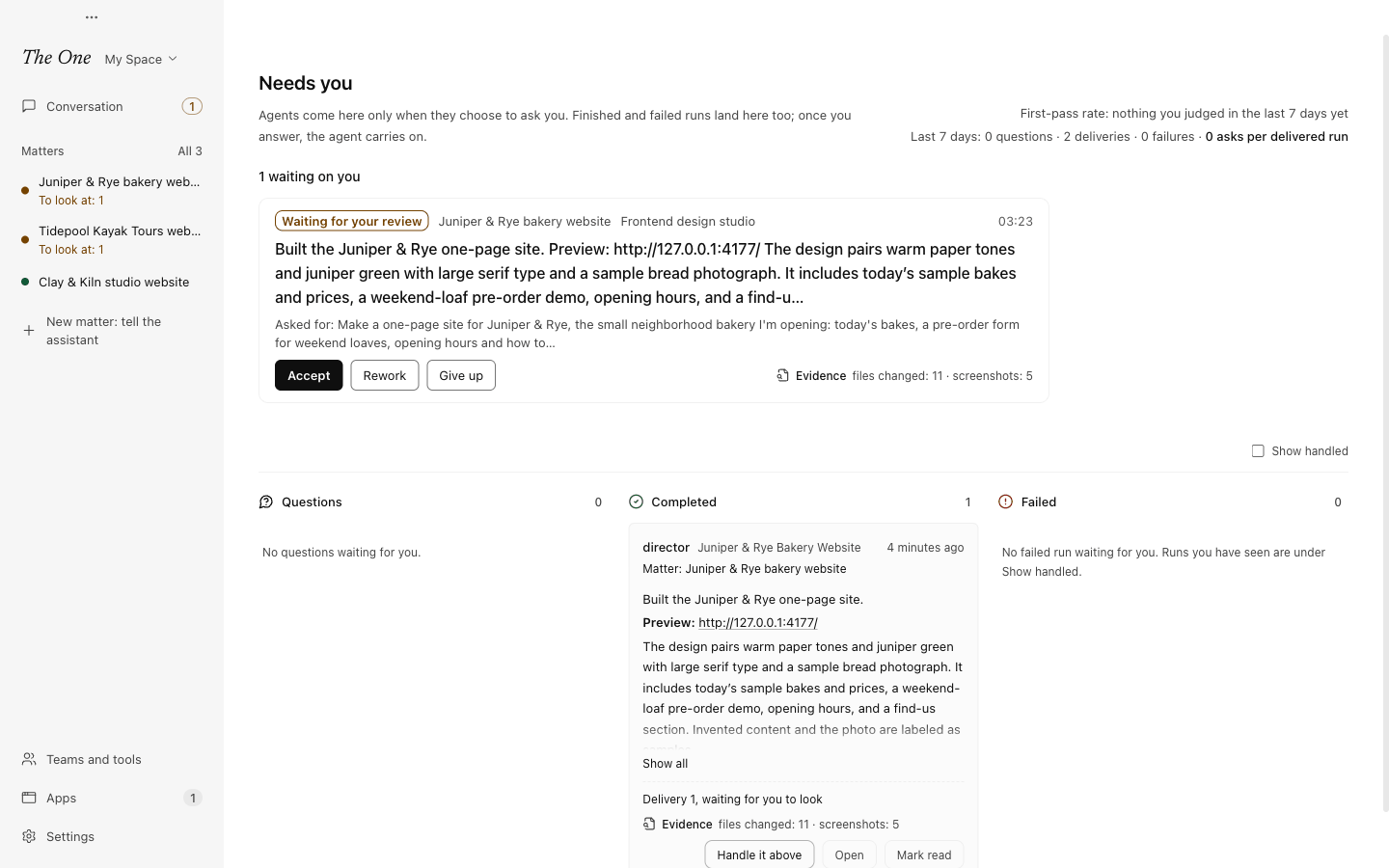
Two readings at the top cover the last 7 days. The first-pass rate is the share of work you accepted at its first delivery, counting only work you judged yourself. The other counts how often you were asked per delivered run. Fewer questions and more first passes mean the Agents get the work right on their own.
Questions from working groups
When a working group on a matter asks something, the main assistant hears it first and answers what it can from what you already told it. You are notified when the question is still open after three minutes, or at once when the main assistant decides only you can settle it, such as your taste, money, accounts or a choice you have not made. When the main assistant answers for you, the question card on the board says so. See Working groups.
Notifications
Each question, delivery and failure is told to you once: a system notification while The One is in the background, a message in the window while it is in front. More than three at once arrive as one notification. The tray menu shows how many are open and lists up to five of them, and on a Mac the Dock icon shows how many things wait for you.
Some deliveries come in quietly. They are in Needs you and the morning report, without a notification:
- work a trigger started, unless that trigger is set to Notify me when its work is done (see Triggers and running in the background);
- work an outside program gave, since that program receives the delivery itself (see Phone channel and outside callers);
- work an Agent hands back after you told it you do not need to hear when it is done.
Questions and failures never come in quietly. A question that someone else usually answers first only waits a little before it notifies you: three minutes for the main assistant, one minute for an outside program.
Judging a delivery
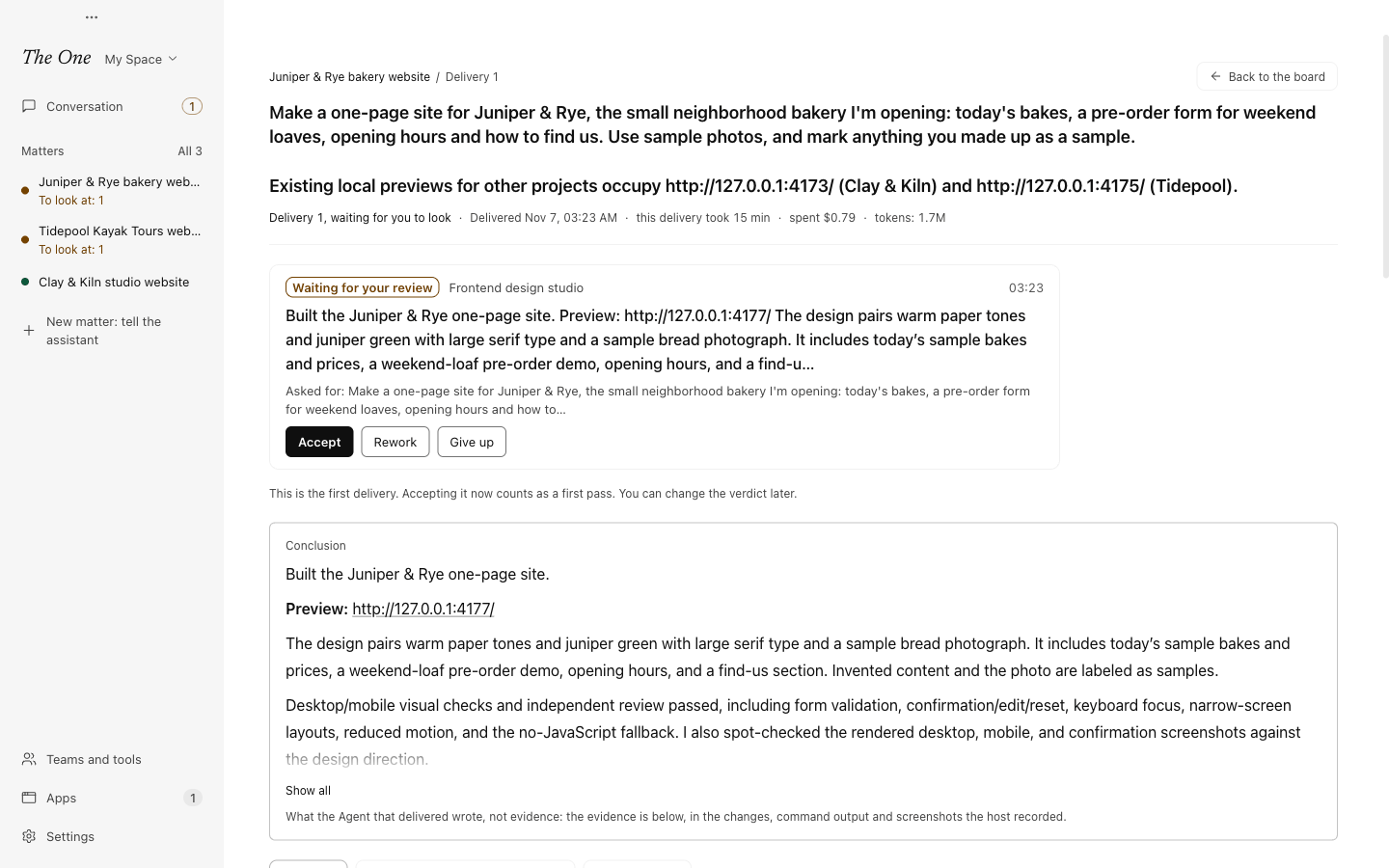
A delivery waiting for you has three buttons. They are the same on its card in the main assistant's conversation, in Needs you, on the matter's board, in the morning report and on the delivery's evidence page:
| Button | What happens |
|---|---|
| Accept | You take the work as delivered. |
| Rework | You write what should change and press Send back for rework. Your words go, as they are, to the Agent that delivered. If its working group is busy with another matter, it hears your words first when it comes back to this one. |
| Give up | After one more check, the work is recorded as abandoned and no further delivery is awaited. The Agent is not stopped. |
A verdict is a record. Apart from rework sending your words, it does not wake or stop anyone. You can change it later with Change your mind on the evidence page, or on the line the card folded into in the main assistant's conversation. If a newer delivery arrived after the page loaded, nothing is recorded and you are asked to look at the new one first.
You do not have to press a button:
- Tell the main assistant what you think of a delivery ("good, thanks", "the totals are wrong") and it records your verdict for you; for rework it passes your words to the group.
- A reply to the Agent after a delivery is read the same way: asking for changes counts as rework, thanks as acceptance.
- A delivery you have looked at and left for 12 hours without asking for changes is Taken as accepted.
- Work still in progress, or failed, with no activity for 7 days is recorded as given up.
Only verdicts you gave, with a button or in your own words, count toward the first-pass rate. Work taken as accepted is counted apart.
The evidence pack
About 15 seconds after each delivery, The One writes an evidence pack for it, so you can check the work without taking the Agent's word for it. Open it with Evidence on any delivery. The page, Evidence · delivery N, shows:
| Part | What it holds |
|---|---|
| Conclusion | What the Agent that delivered wrote, marked as its own account and not evidence. |
| Still waiting for you | Questions the same working group still has open for you on this matter, with a link to answer them. |
| Your verdict | Once it is judged: where it stands, what you said for a rework, and Change your mind. While it still waits for you, its card sits under the page's header instead, with the three buttons and whether accepting now counts as a first pass. |
| Checks | Whether tests ran, whether the last one passed, whether files changed after it, and whether every file the Agent names exists. |
| What changed | Files created, modified and deleted since the work began, with the diff. |
| Test and check commands | Tests, builds, type checks and lints with their folder, exit code and output. Copy command copies one to run again. |
| Visual checks, Screenshots, Outputs | Visual check reports, the images the Agents looked at, and the files they made. |
| How it went | The goal, questions and answers, plan changes, actions outside this computer, undos. |
| Spend | Tokens, model calls, tool calls and time, for this delivery and the whole piece of work. |
The evidence comes from the app's own records, mostly the action log, not from the Agent. Check recomputes the hash of every file in the pack and confirms the action log behind it has not been altered. Ask the main assistant to review has the main assistant check the pack against the project and run the tests again, itself or through a working group; what it finds comes back on the home page. It spends tokens, and only when you press it. Open folder shows the pack on disk.
Packs stay on this computer and are never uploaded. Their text is kept for 180 days and copies of screenshots and outputs for 30 days, sooner when the disk is nearly full. Settings › Data and undo › Storage shows their size under Evidence packs. Packs are written only in the desktop app.
The morning report
The Morning report says what happened since you last looked. It reads only the app's own records. Reading it calls no model and tells no Agent anything, unless you press a verdict.
It has no place in the sidebar; the day's news finds you instead. When you open the app for the first time in a day, or come back to it on a new day after an hour or more away, and there is something you have not seen today, the main assistant greets you in its conversation with the news, and Open the morning report in that greeting opens the report (see The main assistant). If The One is running at 8:00, or the computer wakes after 8:00, it also sends one notification when there is news; a click opens the report.
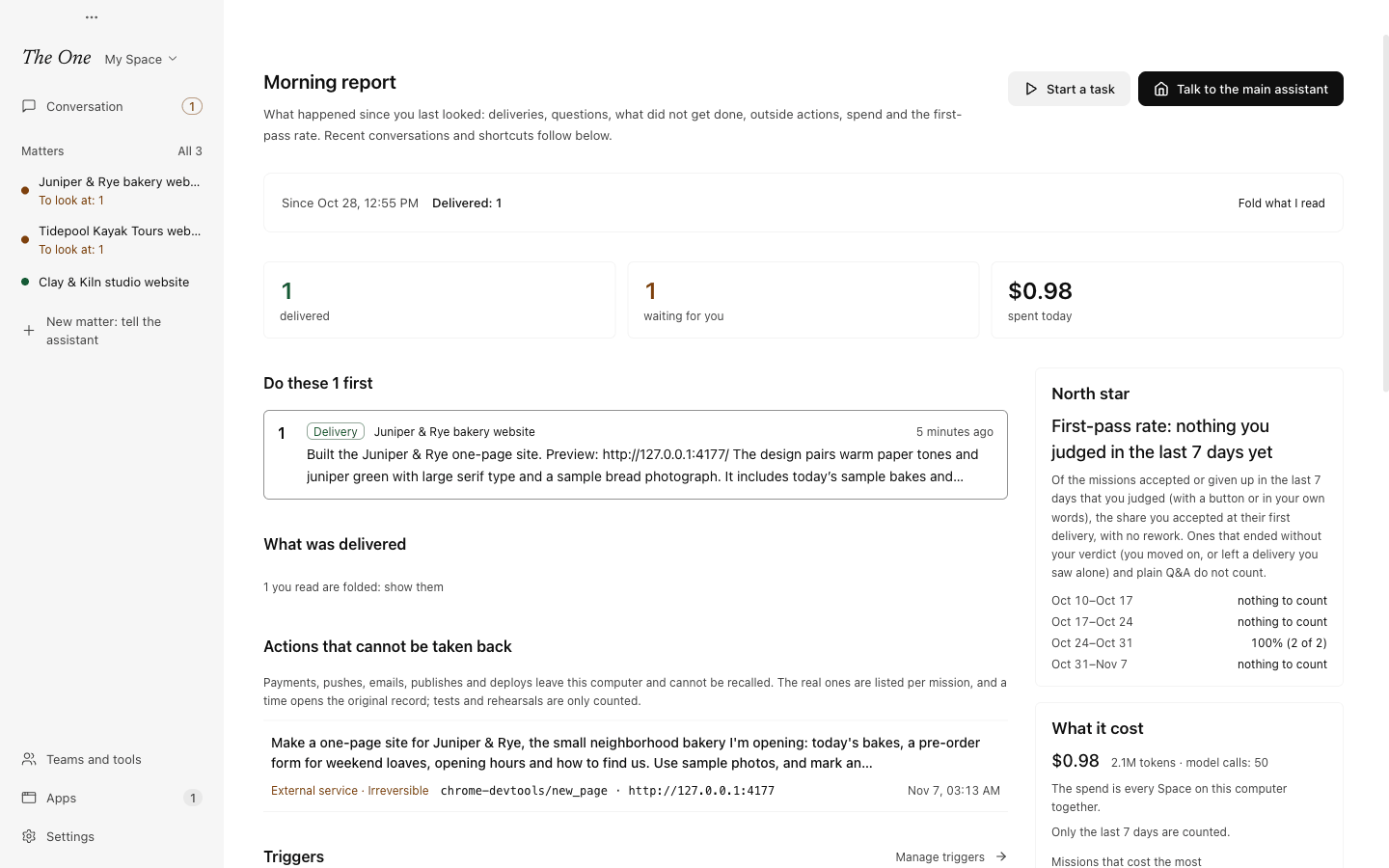
The first line says which window the report covers (Last 24 hours the first time, afterwards Since the time you last looked) and what is new. Three numbers follow: delivered, waiting for you, spent today. Deliveries you have already read are folded away; Fold what I read shows or hides them.
| Section | What it shows |
|---|---|
| Do these 3 first | Up to three of the most pressing things: questions first, then deliveries waiting for your verdict, then model connections only you can fix. The rest are in Needs you. |
| What was delivered | Each piece of work's latest delivery: its goal, how long it took, what it cost, its evidence pack and the verdict buttons. |
| Waiting for your answer | Questions still open, oldest first. |
| Not done | Failed deliveries; work stuck on an error for more than 30 minutes, with what went wrong and where to fix it; work quiet for 24 hours; triggers that went wrong. |
| Actions that cannot be taken back | Payments, pushes, emails, publishes and deploys that left this computer, listed per piece of work. A time opens the original record. |
| Triggers | What fired, what it started, what was skipped or caught up, and what fires next. Manage triggers opens their settings. |
| Last night's review | What the nightly review changed and how its earlier changes are doing, with undo. See Evolution: the lab and the nightly review. |
| Still running | Work in progress: plan steps done, last activity, spend so far. |
| North star | The first-pass rate, its last four weeks and its reading per matter. |
| What it cost | Tokens and spend per day, and the work that cost the most. |
| Next | When the next triggers fire and for which matter, and matters paused at the limit you set. |
| By matter | What happened in each matter. Open one to see its board. |
Most sections appear only when they have something to show. Keeping the report on screen for a couple of seconds counts as reading it, so tomorrow's report starts from then; looking again later the same day does not shrink today's.
The report belongs to the active Space, as Needs you, matters and triggers do. Only the spend covers every Space on this computer, and the report says so.
Related
- The main assistant: where you talk about anything you see here.
- Matters and boards: the board where questions and deliveries also show up.
- Triggers and running in the background: the work that arrives quietly.
- Action log, undo and stopping: the records behind every evidence pack.