
Documentation
Action log, undo and stopping
The One never stops an Agent to ask permission; it records every tool call so you can see what changed, put files back, set limits and stop everything.
The One lets Agents act without asking you first. What keeps you in control is a record and a way back: the Action log records every tool call an Agent makes and keeps a copy of each file before it is changed or deleted, so you can put files back. Usage limits, pausing and Stop All Agents let you halt work whenever you choose.
Why there is no approval step
Agents in The One work on their own and come to you only when they decide to ask. A permission prompt before each action would call you back for every step, and would still not show you what the step did. So nothing blocks, questions or refuses an Agent's call. Instead, every call is recorded and every file change can be undone. Recording costs only the moment it takes to look at the files a call touches.
What the action log records
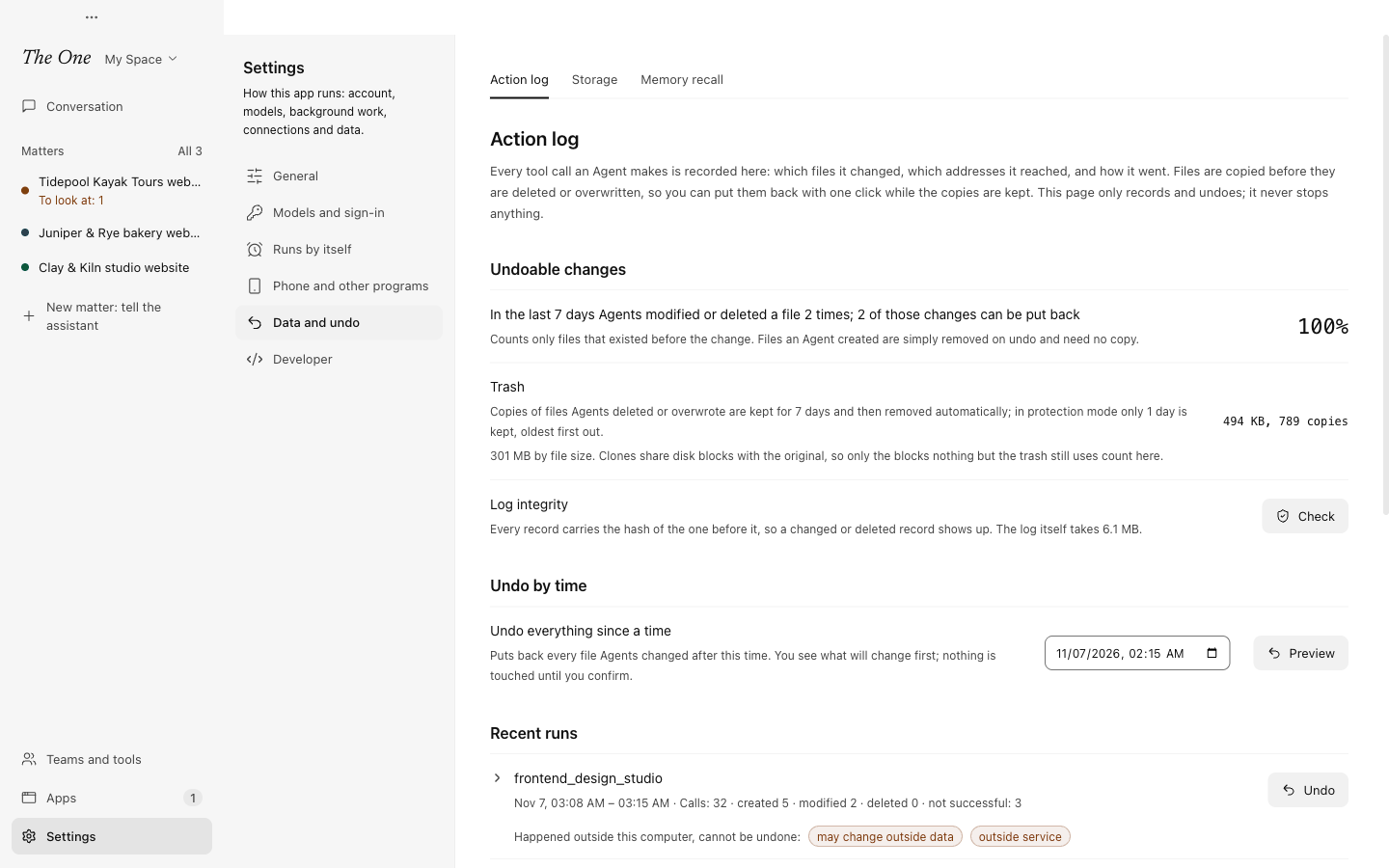
Settings › Data and undo › Action log lists the recent runs. For each tool call it keeps:
- which Agent and which run made it, and the tool and its arguments, with anything that looks like a key or password left out;
- which files it created, modified or deleted, each with its version before and after;
- which addresses it reached, and how it ended.
Calls you make yourself, through a Plugin's panel in a conversation or on a board, are recorded as yours. A call through a panel on a board belongs to no run, so it is listed under Calls outside runs, with the matter it was for.
The log is append-only. Every record carries the hash of the one before it, so a changed or deleted record shows up: Check under Log integrity confirms the whole chain. The log covers the whole computer, every Space, so you can see and undo anything Agents did on it. It is kept only in the desktop app.
At the top, Undoable changes reads how many times Agents modified or deleted a file in the last 7 days, how many of those changes can be put back, and why any file could not be copied.
Undoing
You can undo at four sizes:
| What to undo | Where |
|---|---|
| One call | In Recent runs, open a run and press Undo this call on the call. A call that belongs to no run, such as yours through a panel on a board, is under Calls outside runs; a matter's Changes says how many calls you made through panels and links there. |
| A whole run | Undo on the run in Recent runs. |
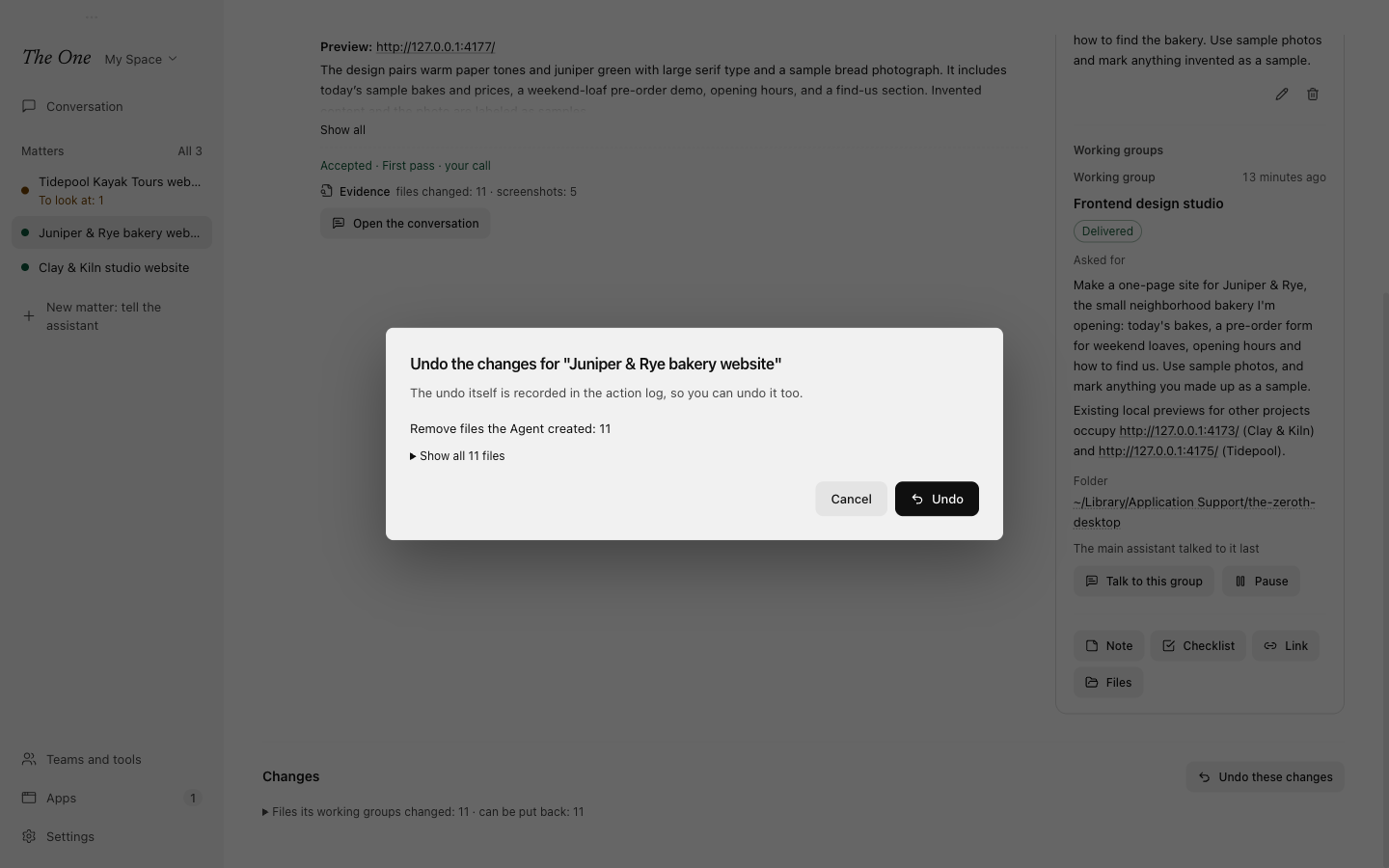
| A matter's work | Undo these changes under Changes on the matter's page. The work of its sub-matters is included. |
| Everything since a time | Undo by time on the Action log page: choose the time and press Preview. |
Every undo shows a preview first, and nothing is touched until you confirm:
- files go back to how they were before the first change in what you chose, and files an Agent created are removed;
- a file changed again since is left alone, unless you tick Put these back too (overwrites the later changes);
- a file whose copy was not kept, or has expired, is reported as such rather than guessed;
- the undo is itself recorded, so you can undo it too with Undo this undo.
The trash
The copies live in the app's trash for 7 days, then are removed automatically. When the disk is nearly full (under 5 GB free, protection mode), only 1 day is kept, oldest first out. On disks that can clone files, such as a Mac's APFS, a copy shares disk space with the original until the original changes (for files up to 4 GB); elsewhere The One makes a full copy of files up to 64 MB, or up to 1 MB in protection mode. Settings › Data and undo › Storage shows how much the action log and its trash take.
What undo does not cover
- Actions that left this computer: payments, pushes, emails, publishes, deploys, remote commands and requests that sent data. They go ahead as usual and are marked on the run ("Happened outside this computer, cannot be undone"), and the morning report lists them under Actions that cannot be taken back.
- Dependency and cache folders, such as
node_modules,.gitand.venv, and folders your.gitignorenames, unless a command names a file in them. - Files whose copy has expired or could not be made.
Reviewing changes block by block
Review on a matter's page shows each working group's changes block by block, with who made each one. Accept, Reject or Comment on each block, then press Submit review: rejected blocks go back as they were, which the log records as an undo you can take back, and your comments go to the Agents. See Working groups.
Limits and pauses
You can stop work short of stopping everything:
- A matter's usage limit. Set a limit in the matter's header sets At most, unattended, in million tokens (at least 10,000 tokens). When the matter's working groups, sub-matters included, have spent that much since you last stepped in, their work pauses at its next checkpoint; a step under way finishes first. The Agents are told at 80%. A banner on the matter and a message in the window say the matter stopped, and it waits for you in the strip above the main assistant's conversation and in Needs you; Resume gives it the same allowance again. You can also ask the main assistant to set a limit or resume the work.
- A run's usage limit. In All runs (Open all runs in Settings › Developer), Usage limit pauses each run of one Graph, or of every Graph, after the tokens you set (see All runs (developer view)).
- One working group. Pause on its card on the board stops it after each member's current step, including its work for other matters; Resume lets it go on.
- A whole matter. Close pauses its work and its triggers; Reopen picks up where they stopped. See Matters and boards.
All of these are cooperative: each Agent finishes the step at hand, then stops.
Stopping everything
Stop All Agents is in the app menu, which on macOS is the The One menu (Cmd+Shift+.), and in the tray menu. On Windows the menu bar is hidden, so use the tray. After you confirm:
- tool calls in progress are interrupted, and commands Agents started are ended;
- every run is paused until you resume it;
- every trigger is paused until you resume them.
Unlike the pauses above, it does not wait for a step to finish. Only you can stop Agents this way; no Agent, not even the main assistant, can.
To go on, resume a working group with Resume on its card on the matter's board, or a run with Unfreeze in All runs; the Agents that were working pick up again. Resume the triggers with Resume All Triggers in the tray menu or Resume all in Settings › Runs by itself (see Triggers and running in the background).
Related
- Needs you, deliveries and the morning report: evidence packs, built from this log.
- Matters and boards: a matter's spending, limit and changes.
- Settings: Storage and the other settings pages.