Documentation
Definition Spaces
A Definition Space holds a whole set of templates, roles, Skills and memory. Copy the official one, then switch, import, export and share Spaces.
A Definition Space is one complete set of what your Agents work with: working-group templates, roles, prompts, Skills, external tools (MCP), request templates and the Space's memory, together with the list of Plugins its roles use. You can keep as many Spaces as you like, for example one per client or kind of work, and they do not affect each other.
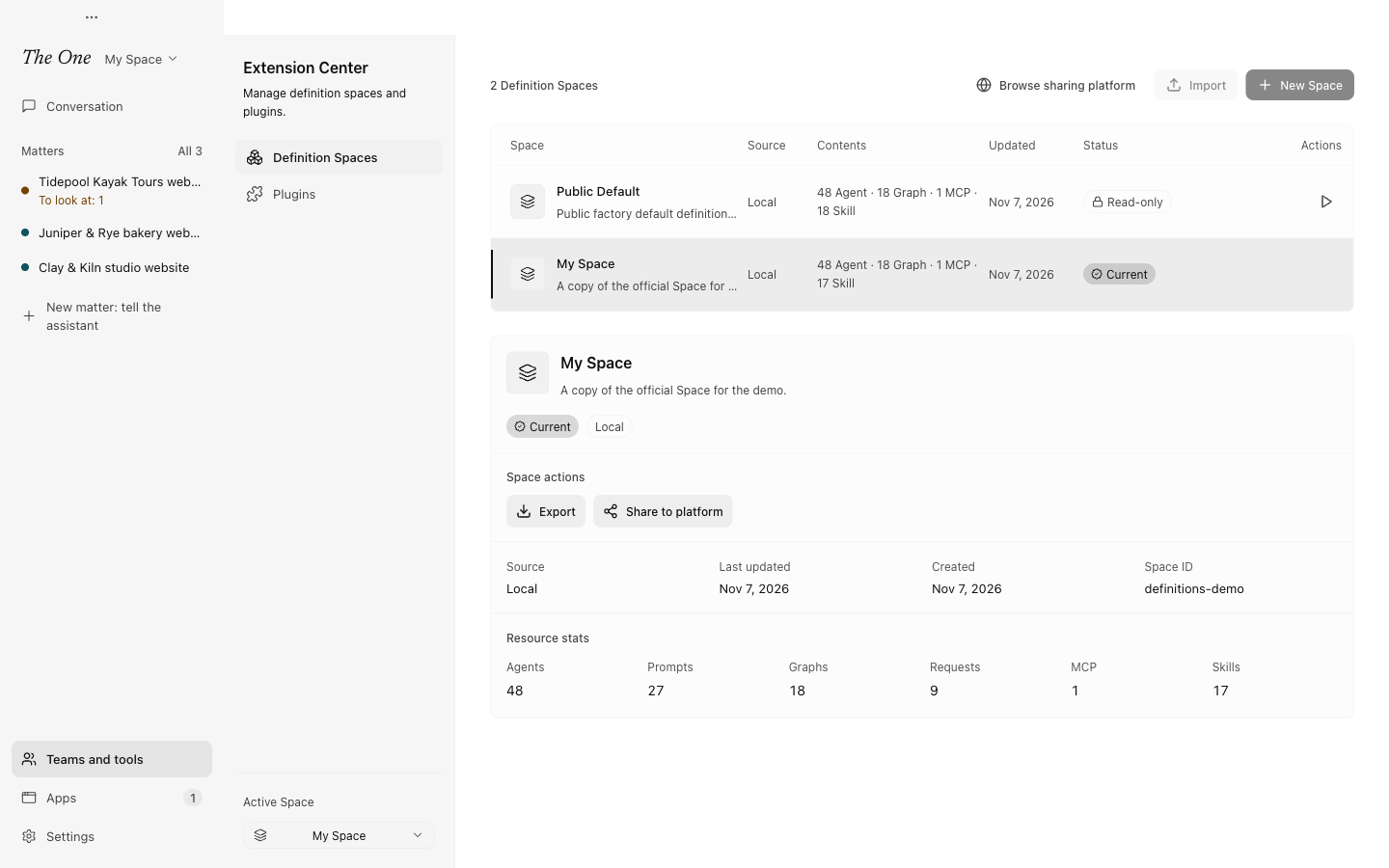
Manage them on the Definition Spaces page. The Space switcher at the top of the sidebar, beside The One, shows the active Space and switches it in one click; Manage Spaces... at the bottom of it opens the page. The page also sits beside Plugins in the Extension Center (Teams and tools › Plugins), and with the developer view on, Teams and tools lists it under In the developer view.
The official Space and your own copy
The One comes with the official Space, listed as Default. It is read-only: the app refreshes it on every launch, so it always carries the current version's templates, roles and Skills, and nothing else can change it. While you work in it:
- what the main assistant and the evolution lab find to improve stays a proposal (see Evolution: the lab and the nightly review);
- Agents cannot write memory, and Plugins cannot be installed into it.
So make it your own. Duplicate to edit on the official Space, or Copy the official Space and use it in Get started, makes a copy that you, the main assistant and the evolution lab can change freely. The cost is that later updates to the official Space do not reach your copy by themselves. When you upgrade The One, it does add new built-ins to your Spaces, without overwriting anything you changed.
Each Space in the list carries a badge: Current for the active one, Read-only or Editable for the others.
What follows the active Space
Only one Space is active at a time, and the app shows that Space's work:
- the main assistant and its conversation: each Space has its own;
- matters, working groups and Needs you;
- triggers: another Space's triggers wait until you switch back to it, and then by default catch up once;
- the morning report and the nightly review;
- the runs in All runs.
Some things belong to the computer instead: model presets and connections (see Models), installed Plugins (each Space chooses which ones it uses), and Settings › Data and undo › Action log, which covers every Space so that undo can reach everything (see Action log, undo and stopping).
Switch, create, duplicate and delete
- Switch here, or the switcher at the top of the sidebar, changes the active Space at once, without a restart. If Agents are still at work, The One says how many and offers Stop and switch: everything running is stopped first.
- New Space starts an empty Space with the built-ins every Space carries: the main assistant, the General group (
chat), Atlas, the nightly review and the evolution lab. - Duplicate copies a Space together with its memory and its choice of Plugins.
- Edit renames a Space of your own or changes its description.
- Delete removes a Space of your own and all of its definitions, for good. The active Space and the official one cannot be deleted.
Export and import
Export packs a Space into a .zerospace file. Keys, tokens and passwords in its MCP settings are removed first. Include agent memory is on by default; turn it off to leave the memory out. See Memory and recall.
Import reads a .zerospace file and shows what is inside before anything is written: how many roles, prompts, templates, MCP servers and Skills it holds, which scripts its Agents could run after the import, which MCP servers would run a command on your computer or connect elsewhere, and anything that fails validation, which stops the import. When the Space contains scripts or local commands, the button reads I trust the source. Import: import only Spaces from sources you trust.
A Space carries references to the Plugins its roles use, never the Plugins themselves. After an import, the Plugins page lists what the new Space's roles still need, so you can install the ones that run on your computer. See Plugins and Apps.
Share on the website
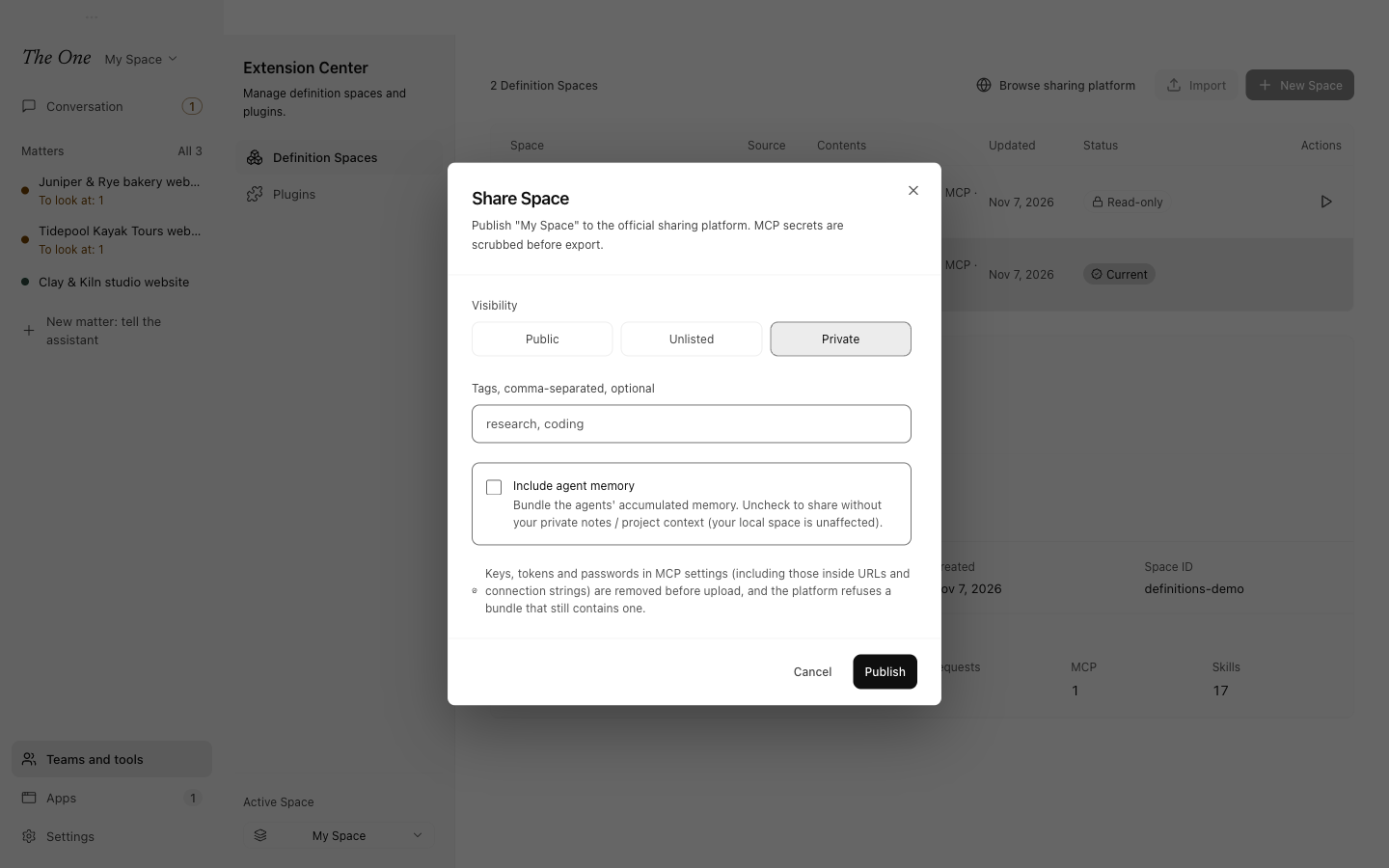
Share to platform publishes a Space to the sharing platform on the-zeroth.com:
- Visibility: Private is chosen for a first share; Unlisted makes it reachable by its link, and Public lists it for everyone.
- Include agent memory is off by default, so your notes and project context stay on your computer unless you turn it on.
- Keys, tokens and passwords in MCP settings, including those inside addresses and connection strings, are removed before the upload, and the platform refuses a bundle that still contains one.
Sharing the same Space again uploads a new version. You need a username, set in the console on the website, before a share link can be made.
To use a Space someone else shared, choose Browse sharing platform, find the Space on the-zeroth.com and choose Open in The One. The app downloads it and shows the same preview as an import from a file.