
Documentation
Memory and recall
How Agents remember across sessions: the Space's memory, a project's notes and AGENTS.md, and earlier sessions' conclusions, ranked by meaning.
Memory lets Agents in The One build on earlier work instead of starting from nothing. A Space keeps the reasons and lessons Agents chose to write down, a project keeps notes of its own, and a new session can find what earlier sessions on the same project concluded. Recall ranks memories, notes and earlier conclusions by meaning, so the pieces that matter reach each Agent.
The Space's memory
A Space's memory is a set of short entries that Agents write when a decision or a lesson will help later work: why a template is built the way it is, or a mistake not to repeat. Each entry is a Markdown file in the Space's memory folder, with a one-line description, its kind (a rationale or a lesson) and where it came from: when it was written, by which Agent and model, in which session. An entry can also say until when it holds, or that it replaces an older one.
Writing a memory is a choice, not a routine step: Agents keep only what will help later. Memory builds up in a Space of your own: in the read-only official Space, Agents cannot write it.
How Agents see it. Before each turn, an Agent that holds the memory tools gets up to 20 memory cards, picked by how well they match the two latest requests it received (within a budget of about 1,600 tokens). A card shows the entry's description and where it came from; the Agent opens the full text only when it needs it, and can search all of memory by meaning. Entries that have expired or been replaced are left out of cards and searches, but stay on disk.
In the official Space, the memory tools belong to the main assistant, the assistant of the General group (chat), the nightly Reviewer and the evolution lab's Director. Give a role of your own the memory tools in its editor, and it sees memory too.
History and undo. When an entry is changed or removed, its earlier version is kept: each entry keeps its last five versions in the Space. Every memory an Agent writes, changes or removes is also recorded in Settings › Data and undo › Action log, where you can put the old version back. See Action log, undo and stopping.
Project notes and AGENTS.md
When an Agent works in a project folder, it also sees knowledge that belongs to the project, whichever Space it works in:
- Notes in
.zeroth/knowledge/. Markdown notes in this folder of the project become cards the same way: up to 20, within about 1,200 tokens, ranked against the latest requests. The software team's lead writes the facts of a repository there, such as how to build and test it, before its first change. The One never creates the folder by itself. - The project's
AGENTS.md. If the project folder has one, the open format that coding agents such as Codex and Claude Code also read, every Agent working in that project gets its full text, up to 32 KiB, and sees changes to it on its next turn.
Earlier sessions
When an Agent's context fills up, meditation folds its history into a summary of what it found and decided (see Meditation). Meditation does not write memory; its summaries are what later sessions can find. With an embedding model, an Agent that holds the memory tools gets up to three cards from other sessions' summaries in the same project when they clearly match what was just asked, each with the session's title and date. Agents can also search memory, project notes and these summaries in one go.
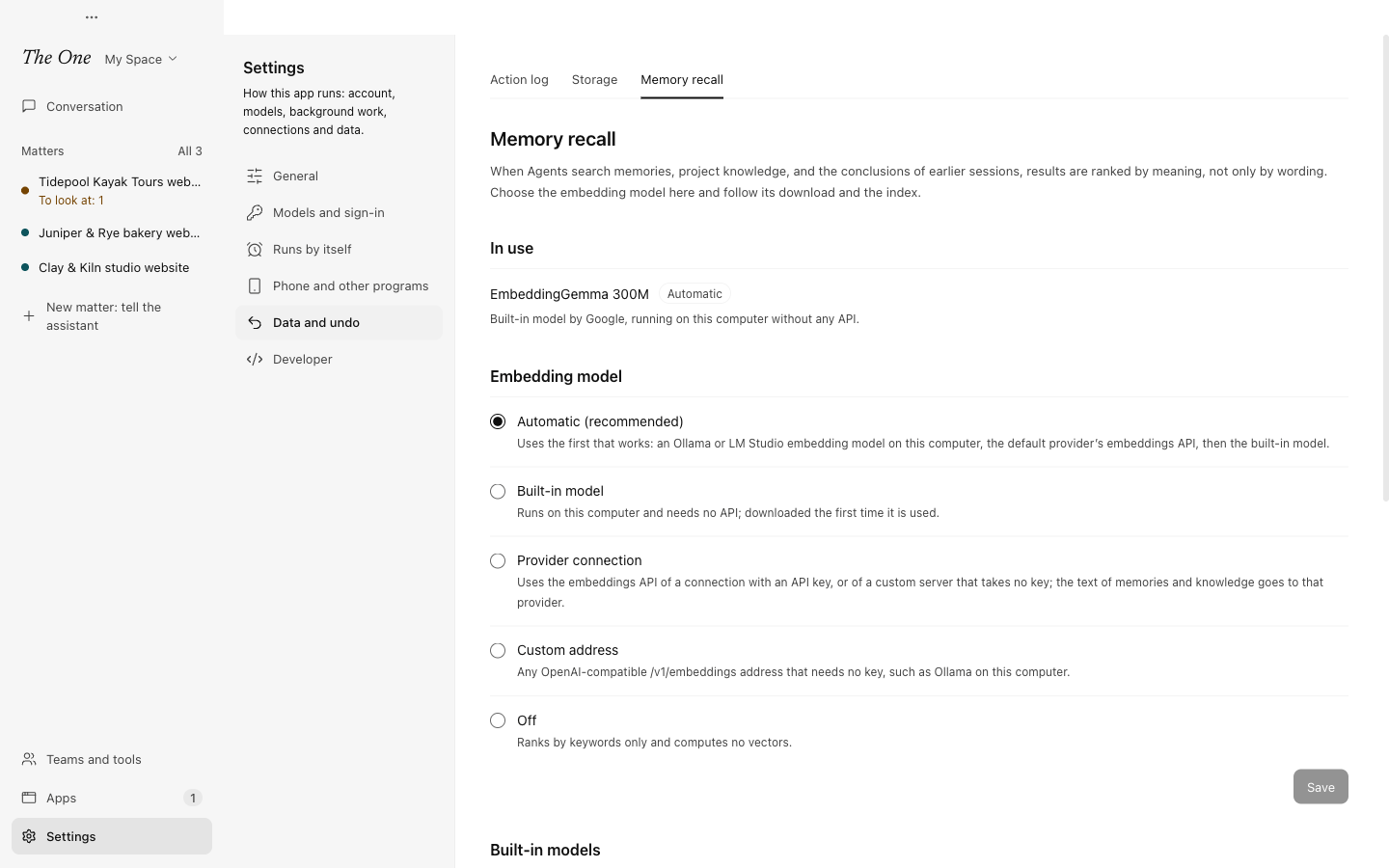
Settings › Data and undo › Memory recall
Recall ranks by meaning when an embedding model is available, so a question in Chinese can find a memory written in English; without one, it ranks by keywords. Settings › Data and undo › Memory recall shows the model In use and lets you choose another under Embedding model:
- Automatic (recommended): the first that works of an Ollama or LM Studio embedding model on this computer, the embeddings API of your default provider, and the built-in model.
- Built-in model:
embeddinggemma-300m, about 218 MB, downloaded the first time it is needed and then run on this computer's CPU, with no API and no network. Until the download finishes, results rank by keywords.bge-m3, about 586 MB, is the other built-in choice. - Provider connection: an API-key connection, or a custom server that takes no key. The text of memories and notes is sent to that provider.
- Custom address: any OpenAI-compatible embeddings address that needs no key, such as Ollama on this computer.
- Off: keywords only.
The Index section shows, for memory, project knowledge and session conclusions, how much is indexed and the progress of any indexing. Rebuild index clears every computed vector, then embeds again in the background what Agents searched in the last 30 days, which costs money when a provider's API does the work.
Who writes memory
- Agents at work, when they hold the memory tools and a lesson or a decision is worth keeping.
- The nightly review. At 03:30 each night, when your real use shows new friction, its Reviewer may write a lesson to memory or change a Skill, at most three changes a night. The morning report's Last night's review shows each change, and you can undo it. See Evolution: the lab and the nightly review.
- The evolution lab's Director, when a round's result should change how working Agents behave.
Meditation is not on this list.
Memory travels with the Space
Memory lives in the Space, so it goes where the Space goes. Duplicate copies it. Export includes it unless you turn off Include agent memory, and Share to platform leaves it out unless you turn that switch on. See Definition Spaces.