
Documentation
API configuration
Connect model services in Settings › Models and sign-in › API Config: the official connection, Sign in with ChatGPT, API keys, custom providers and models on your computer.
Settings › Models and sign-in › API Config holds the connections that Agents send their model requests through: the official connection that comes with a The One membership, your ChatGPT sign-in, API keys for OpenAI, Anthropic and Google Gemini, and any compatible service, including models running on your own computer. A connection only gives access: which model an Agent uses is set in model presets, and each preset names a connection. See Models.
What the page shows
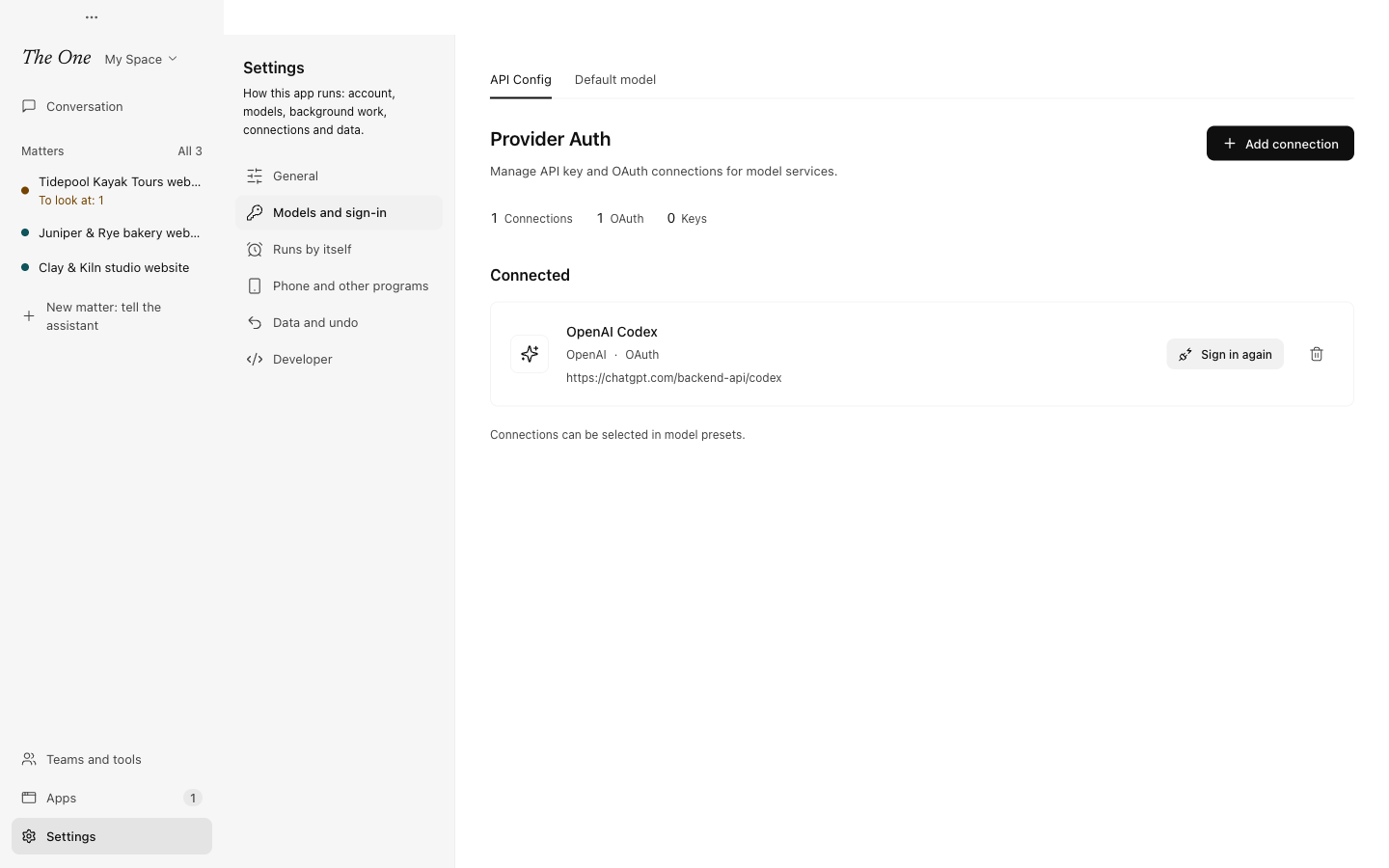
At the top are counts of your Connections, OAuth sign-ins and Keys. Below them comes the official connection, when your account has one, then Connected: every other connection with its provider, its protocol if it is a custom one, how it signs in (OAuth, API Key or No key) and its Base URL. Add connection opens the list of providers.
Keys and sign-ins are kept on this computer, encrypted by the system. Definition Spaces and model presets only refer to a connection; they never hold its key.
The official connection
The official connection comes with a The One membership. It shows as Official OpenRouter with the Official badge, and its card gives your Membership tier, how much of your plan's included usage is left, and Manage subscription, which opens your subscription in the account console in your browser. Your account provides this connection, so you cannot edit or delete it here.
If your account has no official connection, there is no card. During first use, Get started (Start in the sidebar) offers Become a member instead, or you connect a service of your own as below. Plans and usage are explained in Models and Pricing.
Sign in with ChatGPT
With a ChatGPT Plus or Pro subscription, Agents can use its Codex allowance without an API key. Choose Add connection, then OAuth on OpenAI Codex, and sign in on the page that opens in your browser. In Get started the same choice is called Sign in with ChatGPT.
The connection's row shows ChatGPT plan usage: how much of each limit window is used and when it resets. The allowance belongs to your ChatGPT account and is shared with any other Codex app you use. When the sign-in expires, choose Sign in again on the row.
API keys
For OpenAI (Responses API), Anthropic (Claude Messages API) or Google Gemini, choose Add connection, then Connect on the provider, paste the key you created in its console and choose Save Connection. To change the key later, choose Update on the connection's row; leaving the key field empty keeps the saved key.
Custom providers and models on your computer
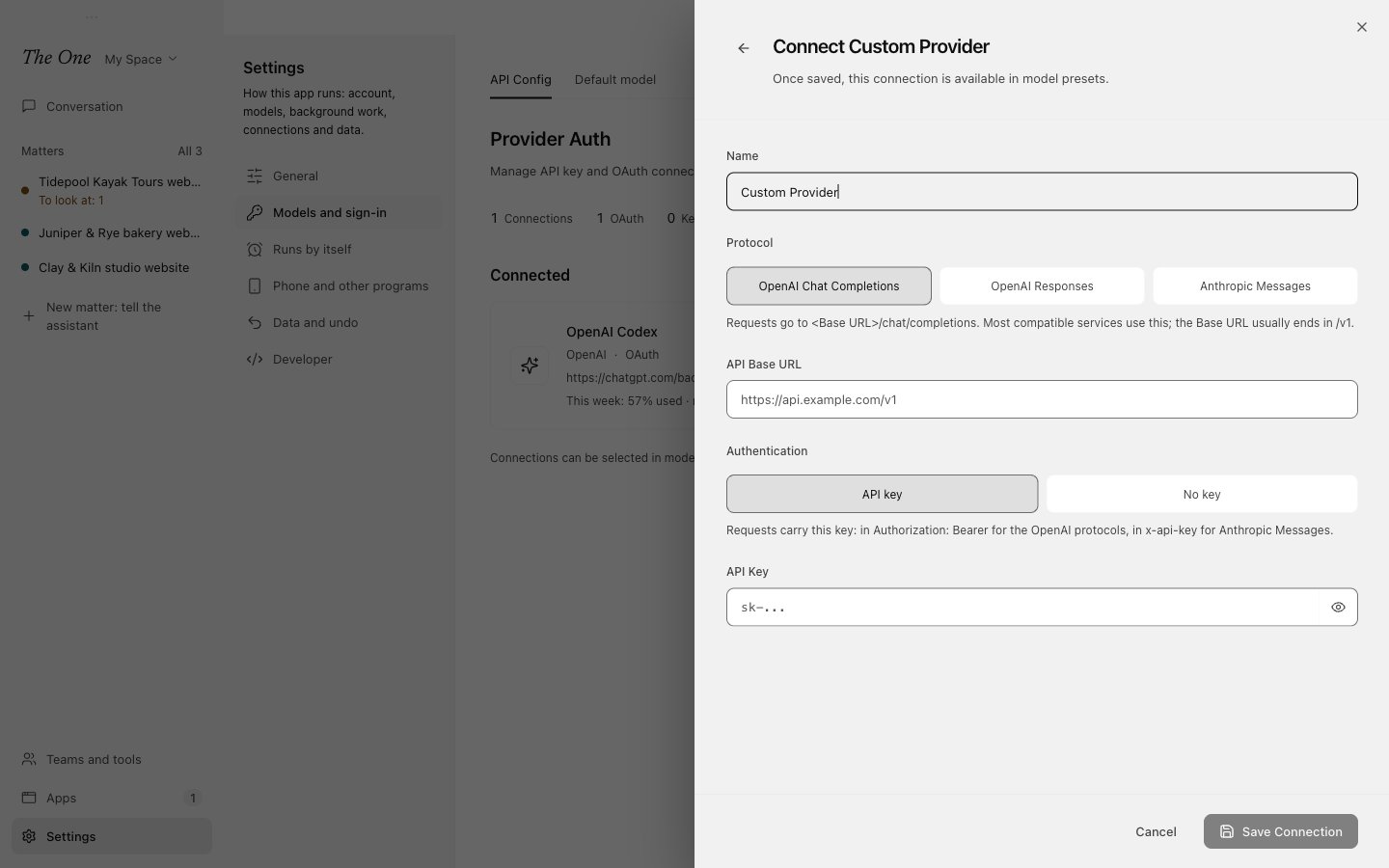
A Custom Provider connects any service that speaks one of three protocols. Choose Add connection, then Add under Custom, and fill in:
- Protocol: OpenAI Chat Completions sends requests to
<Base URL>/chat/completionsand suits most compatible services; the Base URL usually ends in/v1. OpenAI Responses sends them to<Base URL>/responses; choose it only if the service implements that API. Anthropic Messages sends them to<Base URL>/v1/messages, so leave/v1off the Base URL: it is the same value you would give Claude Code asANTHROPIC_BASE_URL. - API Base URL: the service's address.
- Authentication: API key, sent as
Authorization: Bearerwith the OpenAI protocols and asx-api-keywith Anthropic Messages; or No key, for a server that takes no credentials, such as Ollama, LM Studio or vLLM on this computer. With No key, requests carry no key at all, not even one from the environment.
Two examples:
| What | Protocol | Base URL | Authentication |
|---|---|---|---|
| OpenRouter with your own key | OpenAI Chat Completions | https://openrouter.ai/api/v1 | API key |
| Ollama on this computer | OpenAI Chat Completions | http://127.0.0.1:11434/v1 | No key |
Changes apply at once
Saving a connection takes effect without restarting the app. If the app says the backend could not reload, choose Restart Backend in Settings › General.
To use a new connection, pick it in a model preset under Settings › Models and sign-in › Default model. The preset editor also has Refresh models, which fetches the models the connection offers right now. See Models.
Deleting a connection
Choose the trash icon on the connection's row. If roles name the connection directly, a dialog lists them, and Migrate and Delete moves them to another available connection (or, when there is none, back to the default). Model presets that use the connection keep pointing at it, so give them another connection in Settings › Models and sign-in › Default model.
When a provider refuses
When a provider rejects a connection's key or sign-in, the Agent's run says so and links to the connection on this page. Requests through that connection pause on this computer until you update the key or sign in again; the Agent keeps retrying by itself, and the connection is checked again every 30 minutes.
Sign-ins removed in 0.5.0
The One 0.4.28 and earlier also offered Claude Code, Gemini CLI and Antigravity sign-ins. 0.5.0 removed them, because the terms of those products do not allow third-party apps to use their sign-ins. Connect Anthropic or Gemini with an API key instead; OpenAI Codex keeps Sign in with ChatGPT. See The One 0.5.0 Release Notes.