
Documentation
Panorama
Every open matter on one page: each working group drawn as its template's graph, what each Agent is doing now, and today's work as lanes over time.
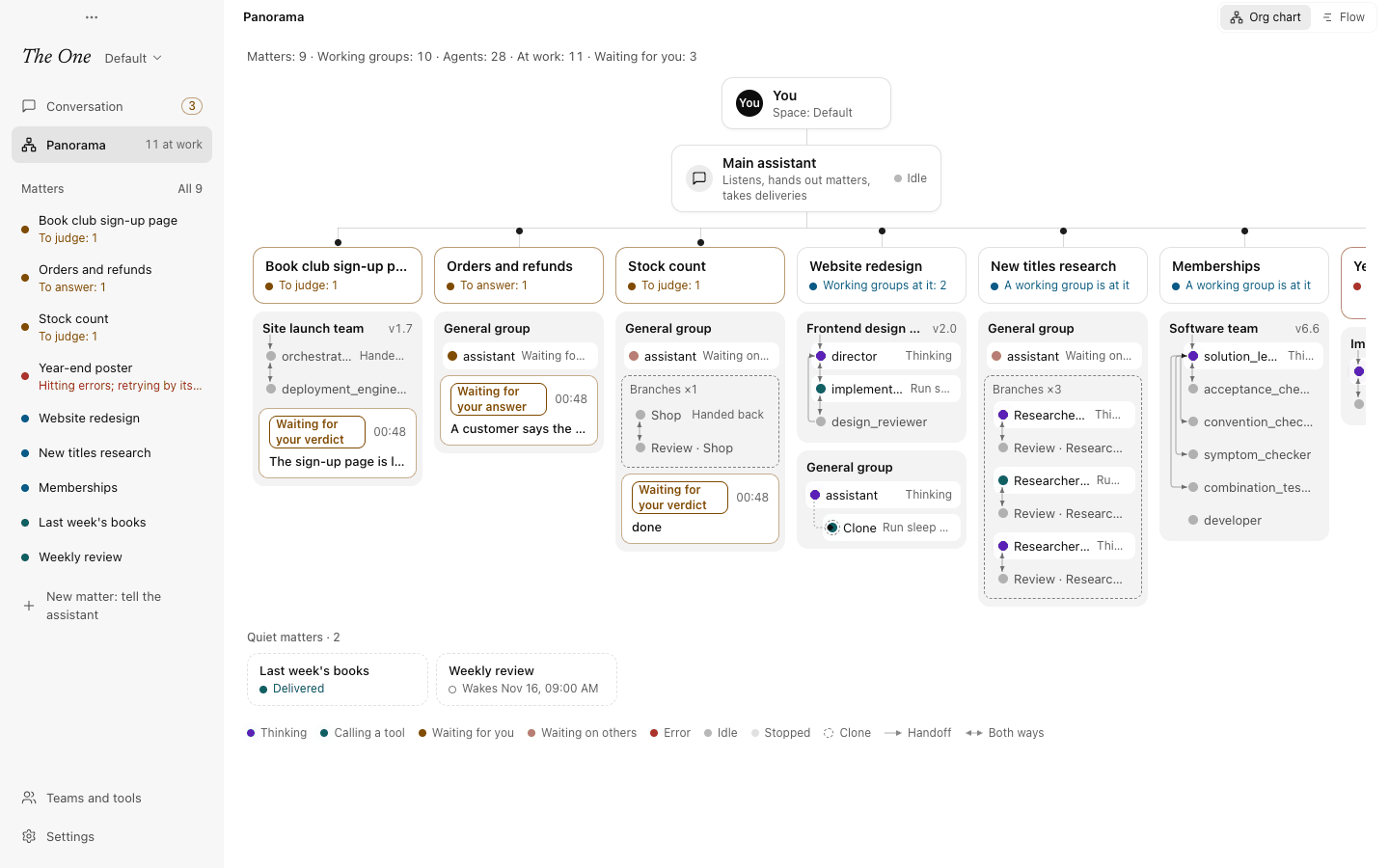
The Panorama draws every open matter on one page: each matter's working groups and their Agents, and whether each is thinking, calling a tool, waiting on someone or in error right now. You see who works on what, where something waits for you and where work is stuck, without opening the matters one by one.
Opening the Panorama
Click Panorama, under Conversation in the sidebar. While Agents are at work it says how many, quietly, such as 3 at work: the Agents on your open matters that are thinking or calling a tool right now. The main assistant is not counted.
The switch at the top right of the page flips between two views:
- Org chart: who works on what, right now.
- Flow: today, one timeline per Agent.
A line at the top of the page gives the counts, such as "Matters: 5 · Working groups: 4 · Agents: 12 · At work: 3 · Waiting for you: 2": the open matters, the working groups on them (a group that serves several matters counts once), their Agents, the Agents at work now, and what waits for you. At work is the number beside Panorama in the sidebar; Waiting for you is the number beside Conversation (see Waiting for you and deliveries).
The page keeps itself up to date while it is open and follows each Agent as it moves. With no open matter yet, it says No matter at work yet, and Tell the main assistant takes you to the main assistant's composer.
The org chart
At the top are You and the Main assistant, which says what it is doing now. Under them, a line holds one column per open matter: those waiting for you first, then those at work, then those in trouble. Matters that have delivered or have nothing going on take no column; they sit under the chart among the quiet matters. When the columns do not fit, the chart scrolls sideways, and you and the main assistant stay over the middle of what you see.
Each column starts with the matter's card: its title and its status line, in the sidebar's words and colours (see Matters in the sidebar). Under it are the working groups at work for it, or No working group yet. A sub-matter has no column of its own: its groups are drawn in its matter's column, marked Sub-matter "…".
Reading a working group
Each group is headed by its name (such as Software team) and the version of its template, such as v6.6. Under that, the group is drawn as its template makes it:
- One row per Agent. A line on the left runs through the group's Agents, each with its dot on the line. The dot's colour and the few words after the name say what the Agent is doing now, in the theater's terms: Thinking; when it calls a tool, what it is doing, such as the file it is writing; Waiting for you; Waiting on others, or Waiting for and the Agent's name when it is known; Error, or Retry N while it retries by itself; Stopped. An Agent that just handed work back says Handed back, and one compacting its own history says Compacting its history; an Agent that is simply idle shows only a grey dot, so its name gets the room. Hover a row for the theater's whole line about it.
- Arrows are the handoffs its template defines: who hands work to whom. Between neighbouring rows an arrow runs along the line; a line with an arrow at each end means work goes down and can come back, as between a lead and a checker. A handoff that skips rows bends out to a lane on the left of the line, the shorter ones nearer the line.
- In a group of two or more Agents, an arrow points into the first one: that is where work enters the group.
- A Clone is a new Agent copied from one in the group, with the same setup, context and tools. It sits indented under the Agent it was copied from, marked Clone (Clone 2 and so on when one Agent has several), with a dashed ring round its dot and a dashed elbow from its source. A clone hands work on as its source does, so its arrows are not drawn again.
- Branches: a TaskBoard layer the lead hands out, or a team the group opened for part of its work, sits in a dashed box inside the group, drawn by its own handoffs. A TaskBoard layer counts its tasks, such as Branches ×3 (one worker per task; the Agent that checks a task is not counted); a team is named like a group, such as Software team; a box running a sub-matter's work reads Sub-matter "…".
- Finished branches are no longer drawn one by one: they fold into one line, Branches done: N, which opens the matter's theater, where their history is.
What waits for you hangs under the group that delivered it or asked it, two lines each: what it is (such as Waiting for your verdict), when it came, and its first words. A matter paused at its limit, or a model connection for you to fix, hangs under the matter's card.
Once a working group is drawn, a legend under the chart shows the seven states' colours (Thinking, Calling a tool, Waiting for you, Waiting on others, Error, Idle, Stopped), and Clone, Handoff (an arrow at one end) and Both ways (an arrow at each end).
What a click does
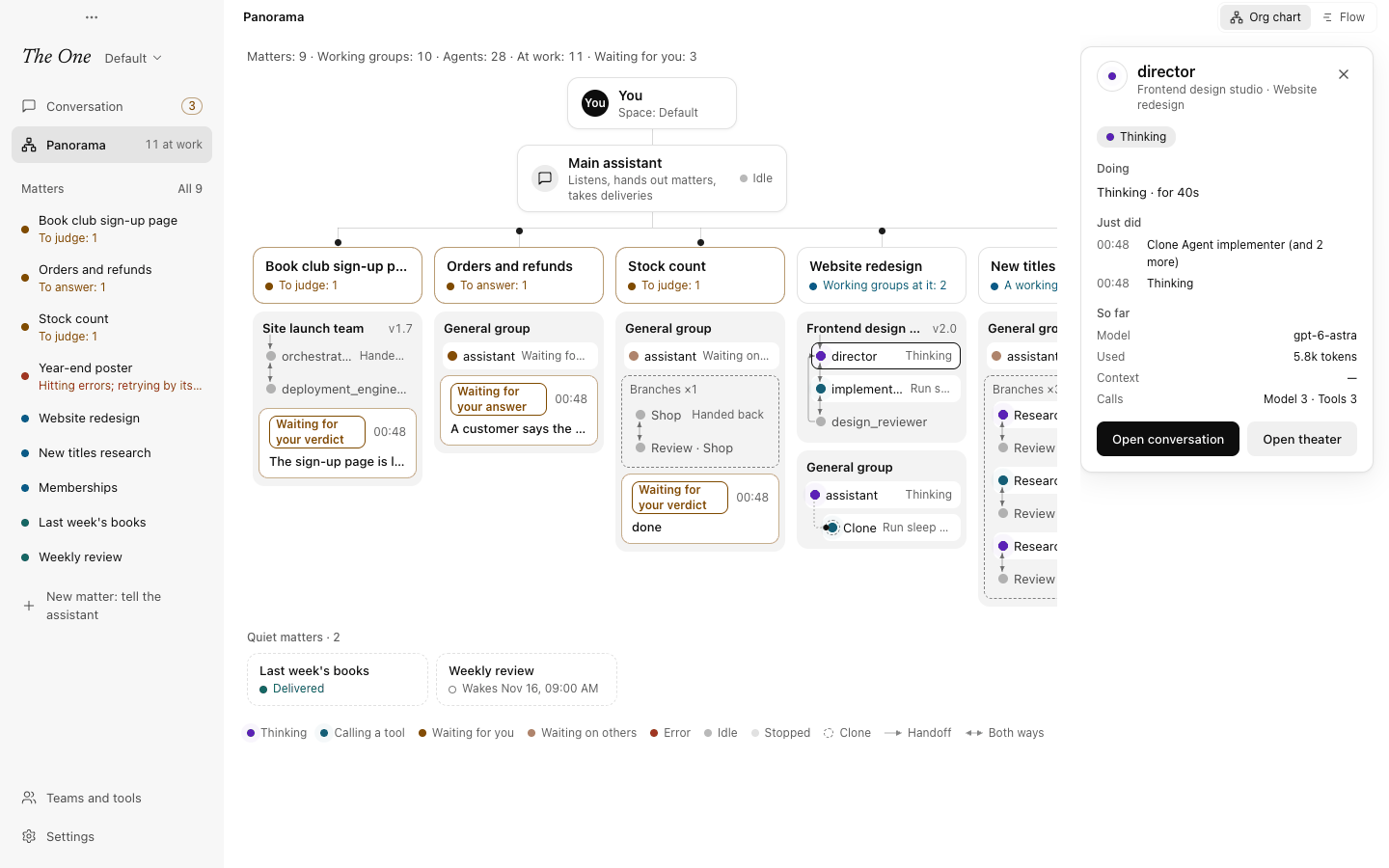
- An Agent opens its details to the right of the chart: its name, its group and matter, and its state now; then Doing (what it is doing now), Just did (its last steps, with times) and So far: its Model, how many tokens it Used, how full its Context is, and its Calls to the model and to tools. Open conversation opens that Agent's conversation, as a group's conversation opens from its board: what you write there goes straight to it as your own words. Open theater opens the matter's theater. Click the same Agent again, the close button or press Esc to close the details.
- The main assistant opens its details the same way; their button, Go to the main assistant's conversation, takes you home.
- Something that waits for you opens its whole card to the right of the chart, under Waiting for you, with all its buttons: judge, answer, go and fix, or resume. Once you have dealt with it, it no longer waits and the card closes; Esc closes it too.
- A group's name opens the matter's theater.
- A matter's card opens the matter's board.
When nothing is at work
When no matter is at work, the line under the main assistant reads Nothing is at work now, with Tell the main assistant; in a Space with no matter yet it reads No matters yet. The quiet matters keep their row below, and under them is a row Working groups standing by · N: six groups, each with its one line, and See what each can do in Teams and tools for the rest (see Teams and tools).
Quiet matters
Matters that have delivered, or have nothing going on, share one row under the chart, headed Quiet matters · N, so the matters at work get the columns and the width. Each is a small dashed card with its title and its line; when it has triggers on, the line says quietly when it wakes next (Wakes …, with the day and time), except while every trigger is paused. A matter whose groups have two or more Agents shows a row of small dots, one per Agent. Click a card to open the matter.
Closing a matter
Hover over a matter's card (or reach it with the keyboard), in a column or among the quiet matters, and an end button shows at its top right. It asks once more and names what on the matter still waits for you: Handle them first takes you to the matter's page, and Close matter closes it. A closed matter leaves the Panorama and the sidebar, its work stops at the step it is at, and what waits on it is put away until you reopen it. See Closing and reopening.
The flow
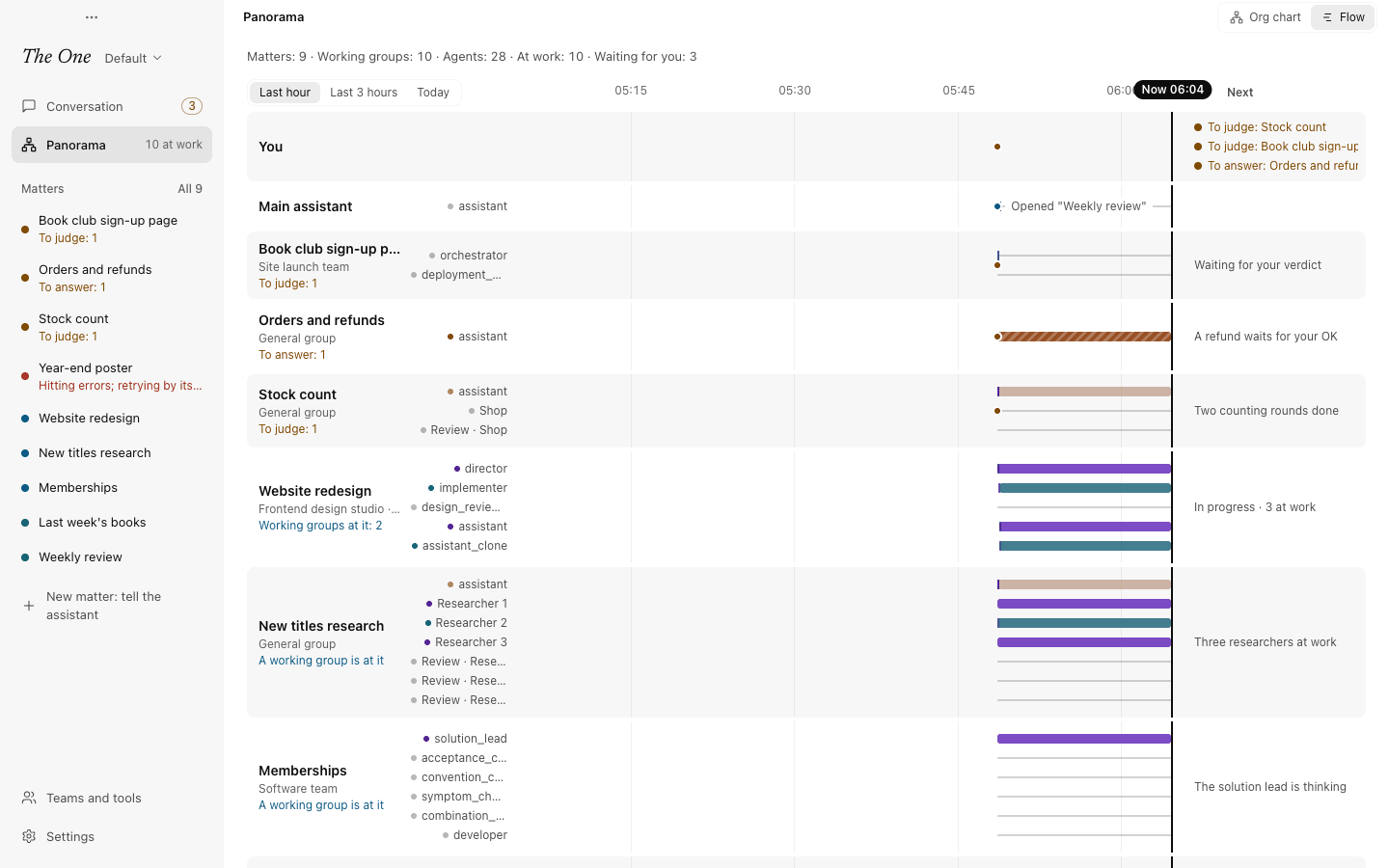
Flow draws today as lanes:
- At the top is You, then the Main assistant, then one lane per open matter, quiet ones included. A matter's lane is labelled with its title (which opens the matter), the working groups on it and its status line, or Quiet for a quiet matter with no triggers.
- In a matter's lane each of its Agents has a thin track, in the theater's colours, showing when it was thinking, calling a tool, waiting or in error today; idle and stopped stretches are a thin line. Agents of finished branches are there too. Click an Agent's name on the left for its details, as on the org chart.
- The lanes run up to now on the right, marked with the time, such as Now 14:05.
- Dots on the lanes are moments: on yours, deliveries, questions and failures that still wait for you, at the time they came; on a matter's, its deliveries today and the questions and errors that wait; on the main assistant's, the matters opened today, each written beside its dot as Opened "…". Hover a dot to see what it is.
- The column on the right is Next: on your lane, a few things waiting for you, such as To judge: … or To answer: …; on a quiet matter with triggers, when it wakes next; on other matters, the one-line summary the main assistant keeps.
Above the lane names you pick how much of the day to see: Last hour, Last 3 hours or Today (the default, from the hour the first Agent started today). The lines across the lanes fall on the clock's round quarter, half or full hours.
The flow has its legend too: the seven states' colours, and two kinds of dots: What you asked for goes down (a matter the assistant opened) and Deliveries and questions come back to you.
Motion
The dots of Agents thinking or calling a tool breathe gently. For two minutes after the main assistant hands one of a matter's groups work, or the group delivers, a dot runs along the line between the assistant and that column: down for work handed out, up for a delivery. When two Agents in a group just handed work over, a dot runs along the arrow between them. With reduced motion turned on in your system settings, nothing moves.
Related
- Working groups: the group card, talking to a group, theater and review.
- Matters and boards: each matter's own board.
- Waiting for you and deliveries: what waits for you, and its card.